Hi~ My Friend!

About My Name
"Vladelaina" combines the names of my favorite anime heroines — Vladilena Milizé from 86 -Eighty Six- and Elaina from Wandering Witch: The Journey of Elaina.
If you haven't watched these two works yet, I sincerely recommend them. The plots and characters are fantastic and definitely worth following!
Now, let me introduce you to the Catime user guide~
Demo Video
Here is a demo video to help you better understand how to use Catime:

Getting Started

No installation required. When opened for the first time, a 25-minute countdown will appear at the top.

Tip
It is recommended to drag the Catime tray icon from the hidden area to the taskbar for easier access.
Basic Operations
All operations in Catime are done by clicking the taskbar icon:
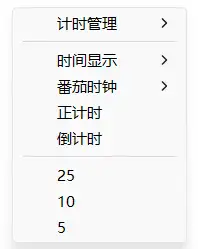
Left Click
Open Time Management Interface
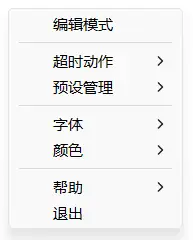
Right Click
Open Settings Menu
Customization
My friend, I believe you can't wait to move the window position, right? For example, moving it to the bottom left corner of the screen. At this time, simply Right-click the tray icon and select "Edit Mode". Then, the window will turn into an acrylic background, and you can drag with the mouse to adjust the position, and use the scroll wheel to adjust the size. After adjustment, right-click on the window to close Edit Mode~

Congratulations!
At this point, congratulations 🎉 you have mastered the core content of Catime. The rest is basically self-explanatory 😉.